PAINTING GALLERY
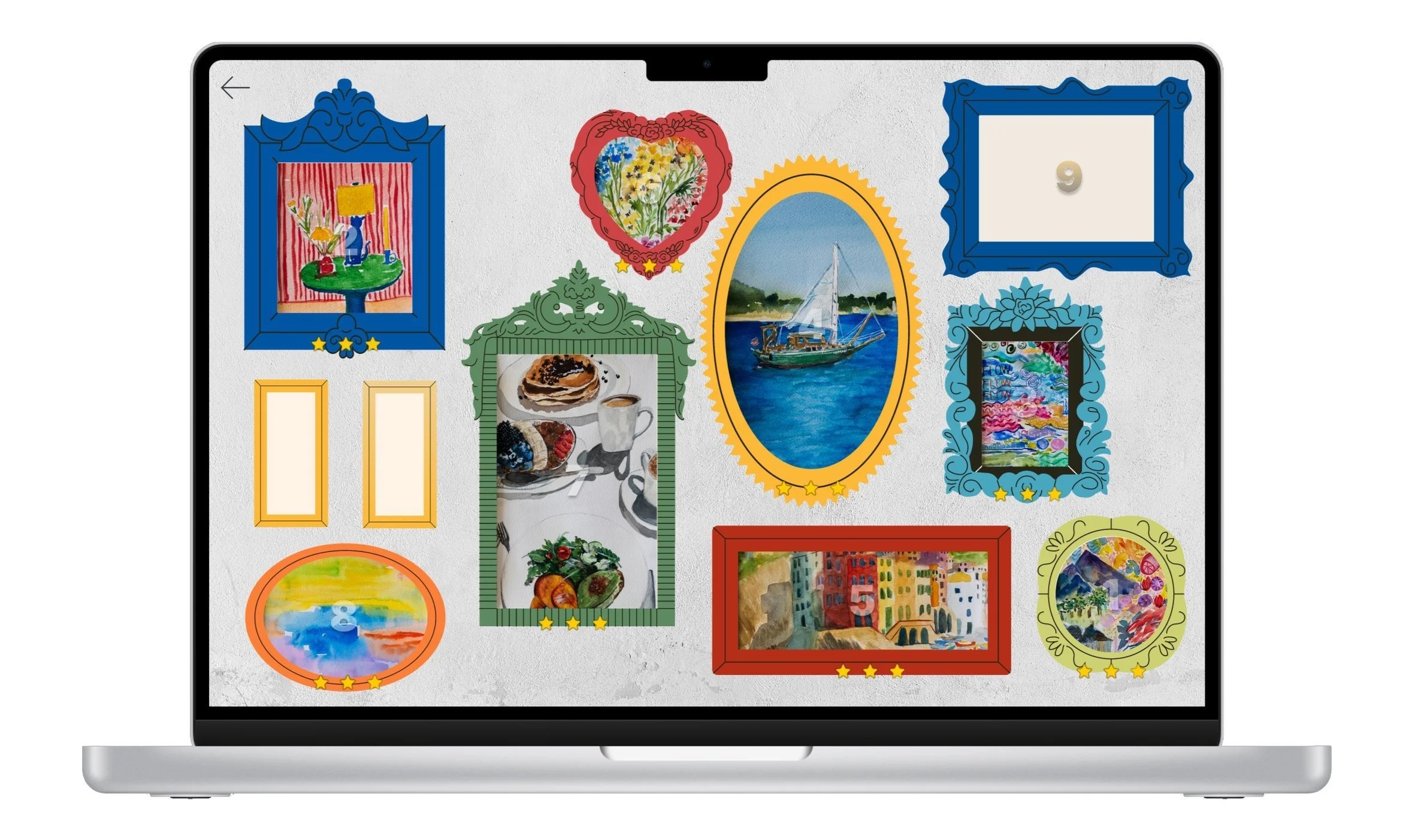
After exhibiting my paintings at Bay Street Mall in Emeryville through the RCCD association, I began thinking about the people who could not experience the exhibition in person. While the physical show created a sense of presence, intimacy, and discovery, loved ones who lived far away could only see the work through photos or social media posts.
This project explores how a digital gallery can recreate some of the emotional engagement of an in-person exhibition. Instead of simply placing paintings on a webpage, I designed an interactive experience where users could unlock paintings through small puzzle-based interactions, explore the gallery, view exhibition photos, and learn the story behind each artwork.
The goal was to make the experience feel personal, playful, and accessible, especially for users who were not physically present at the exhibition.
PROBLEM
People who cannot attend an art exhibition in person often miss more than just the artwork. They miss the feeling of entering the space, discovering pieces one by one, reading the artist’s context, and spending time with the work.
A traditional online gallery can solve the visibility problem, but it does not always solve the engagement problem. Users may scroll quickly, look passively, or feel disconnected from the atmosphere of the exhibition.
The design challenge was:
How might I create a digital gallery experience that helps remote viewers feel included, engaged, and emotionally connected to the paintings?
USERS
The primary users for this experience were friends, family, collectors, and online visitors who could not attend the physical exhibition. These users needed a way to experience the work remotely without feeling like they were simply looking through a static image album.
The experience also considered casual website visitors who may not know the full story behind the exhibition but could be drawn in through interaction, curiosity, and visual storytelling.
USER NEEDS
Users needed a way to:
View the paintings remotely.
Understand the story behind each piece.
See documentation from the physical exhibition.
Engage with the artwork in a more meaningful way than scrolling.
Choose whether they wanted to play, browse, or explore at their own pace.
A key insight was that not every user wants to interact in the same way. Some users may enjoy solving puzzles, while others may want direct access to the gallery first. This shaped the final structure of the experience.
USER PAIN POINTS
The original experience problem centered around three main user pain points:
Remote exclusion
Users who were not near the exhibition could not experience the physical gallery environment.Passive viewing fatigue
Users are often used to scrolling through images quickly online, which can make artwork feel less memorable or immersive.Unclear interaction flow
In early versions, users were not always sure where to begin, how to move through the gallery, or whether they had to finish the game before accessing the artwork.
DESIGN GOAL
My goal was to design a digital gallery that balanced playfulness with clarity. I wanted users to feel invited into the world of the exhibition without making the interaction feel confusing or overly complicated.
The experience needed to do three things:
Make users feel included, even if they were not physically present.
Encourage deeper engagement with each painting.
Give users flexible ways to explore the work.
SOLUTION
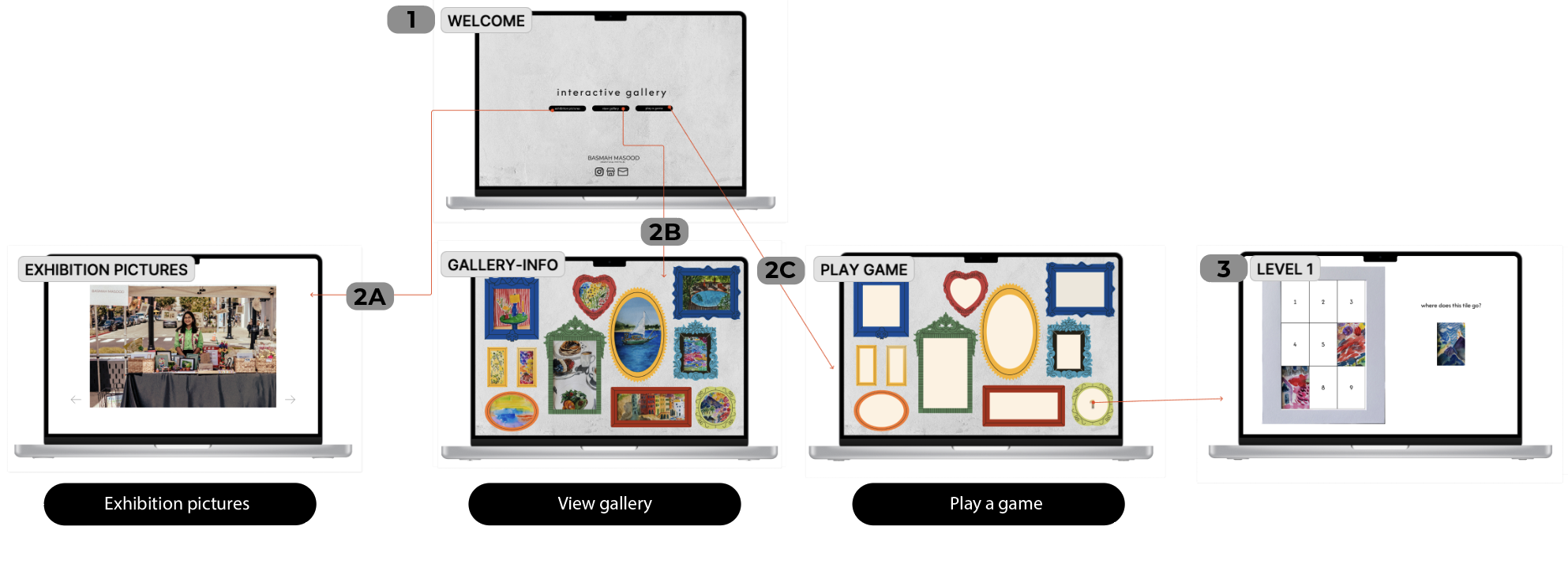
The final solution is an interactive digital gallery with three main pathways:
Play the Game
Users can interact with puzzle-based levels that allow them to unlock paintings.View Gallery
Users can browse the paintings directly, learn about each artwork, and explore the collection without needing to complete the game first.View Exhibition Pictures
Users can see documentation from the physical exhibition, helping them understand the atmosphere and context of the original show.
KEY FEATURES
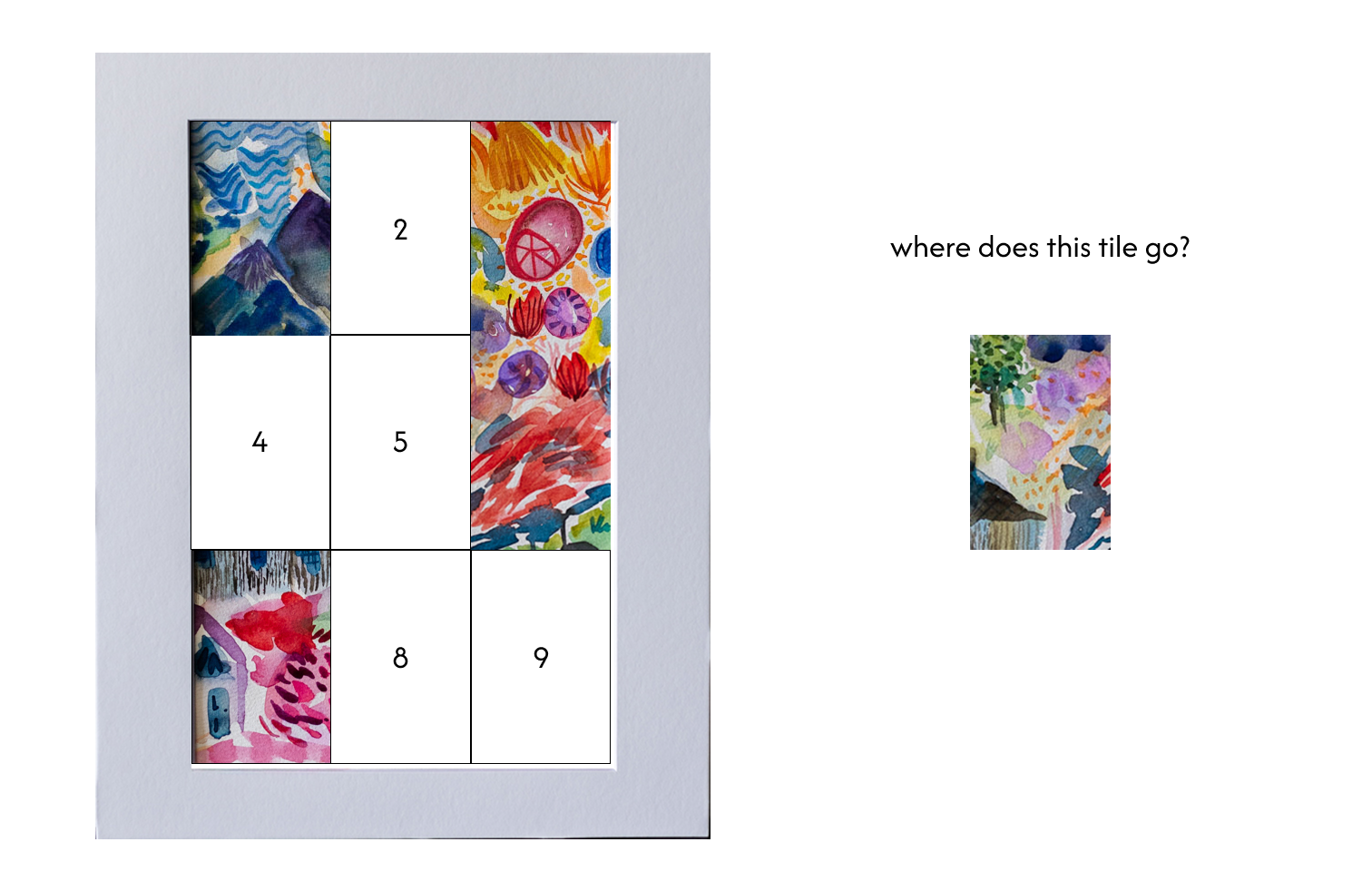
Puzzle-Based Artwork Discovery
To create a slower, more intentional viewing experience. I turned the paintings into interactive puzzles so that users would spend more time with each piece.
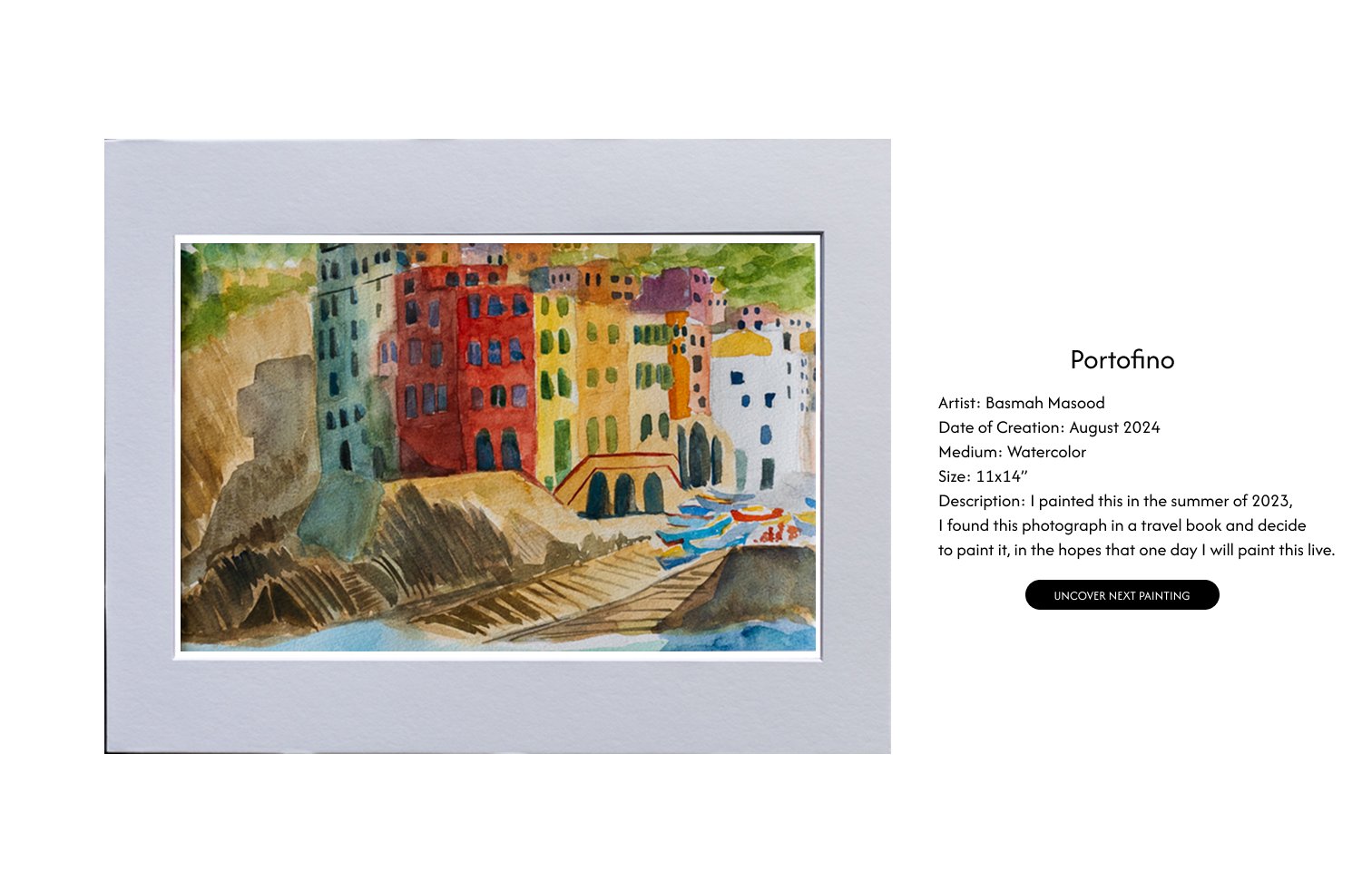
Gallery Access
Users can enter the gallery and view the paintings. This ensures that the experience remains accessible for users who may not want to play a game.
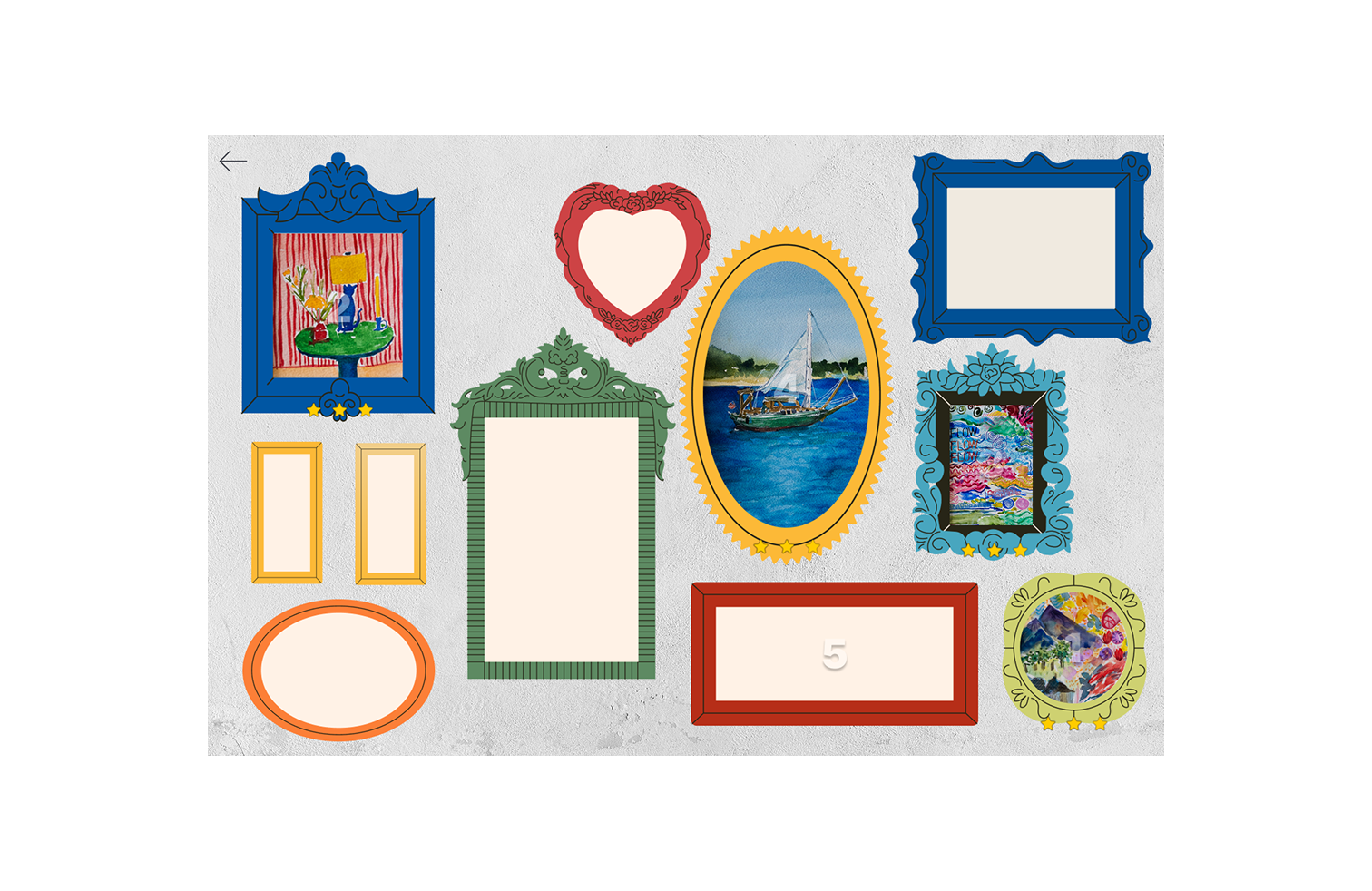
Guided Progression
Numbered frames were added to help users understand where to begin and how to move through the experience. Created a clearer sense of progression.
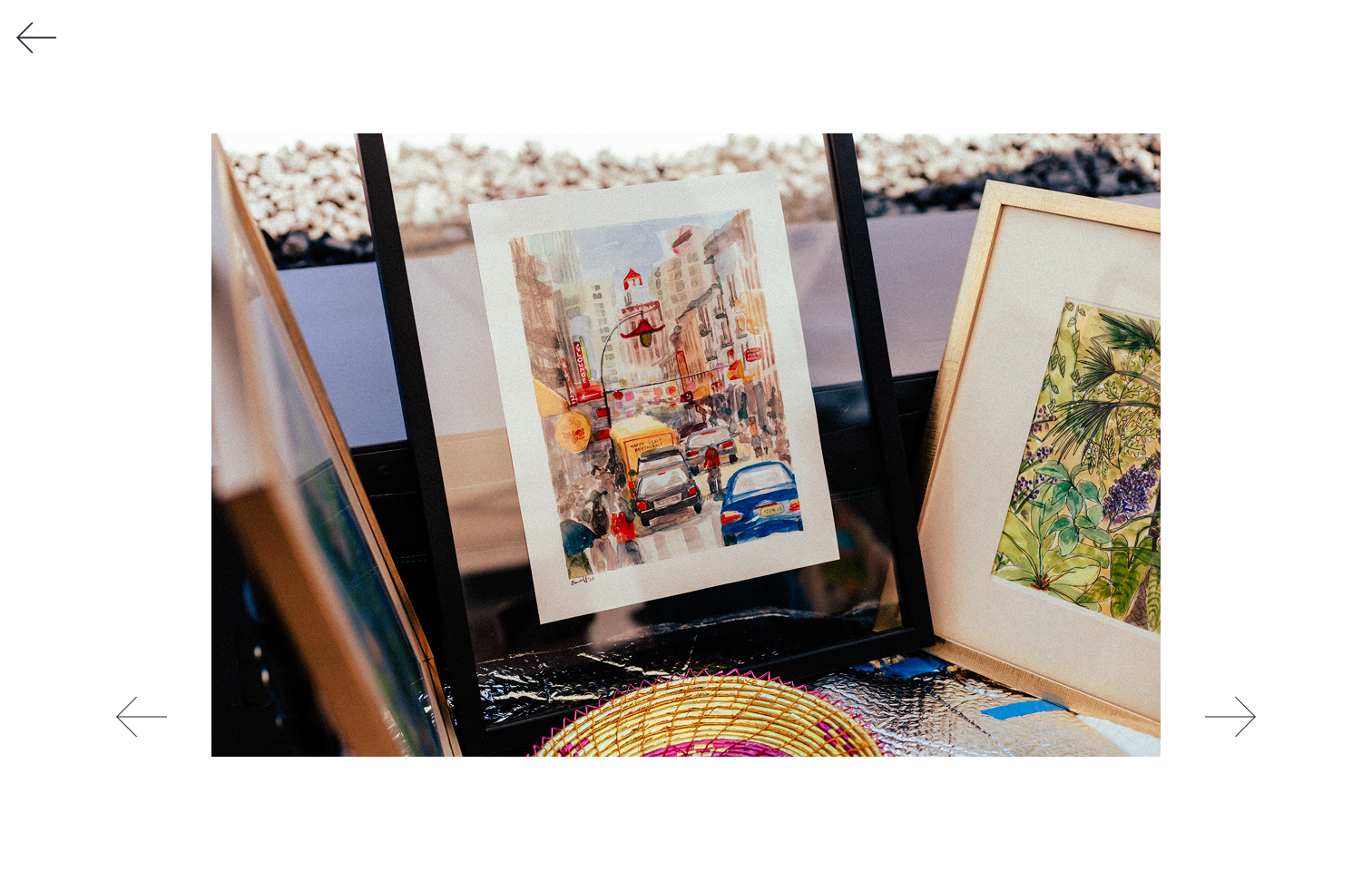
Exhibition Photo Album
The exhibition photo section gives users a sense of the original physical space. It helps remote viewers understand how the work was experienced in-person.
Curious about how the game works? Watch this guided video walkthrough to see how to play, interact with the gallery, and explore its features. Click to start and experience the project in action!
INTERACTION DESIGN
The experience was designed around curiosity and choice. The game mechanic encourages users to unlock paintings, while the gallery view allows them to explore freely.
Early versions leaned more heavily on the game structure, but feedback showed that users wanted more control. Some users wanted to see the gallery before playing so they could gather clues. Others wanted access to exhibition photos without having to finish the game.
This feedback helped me shift the experience from a linear game into a more flexible interactive gallery.
ITERATIONS
User feedback shaped several important changes.
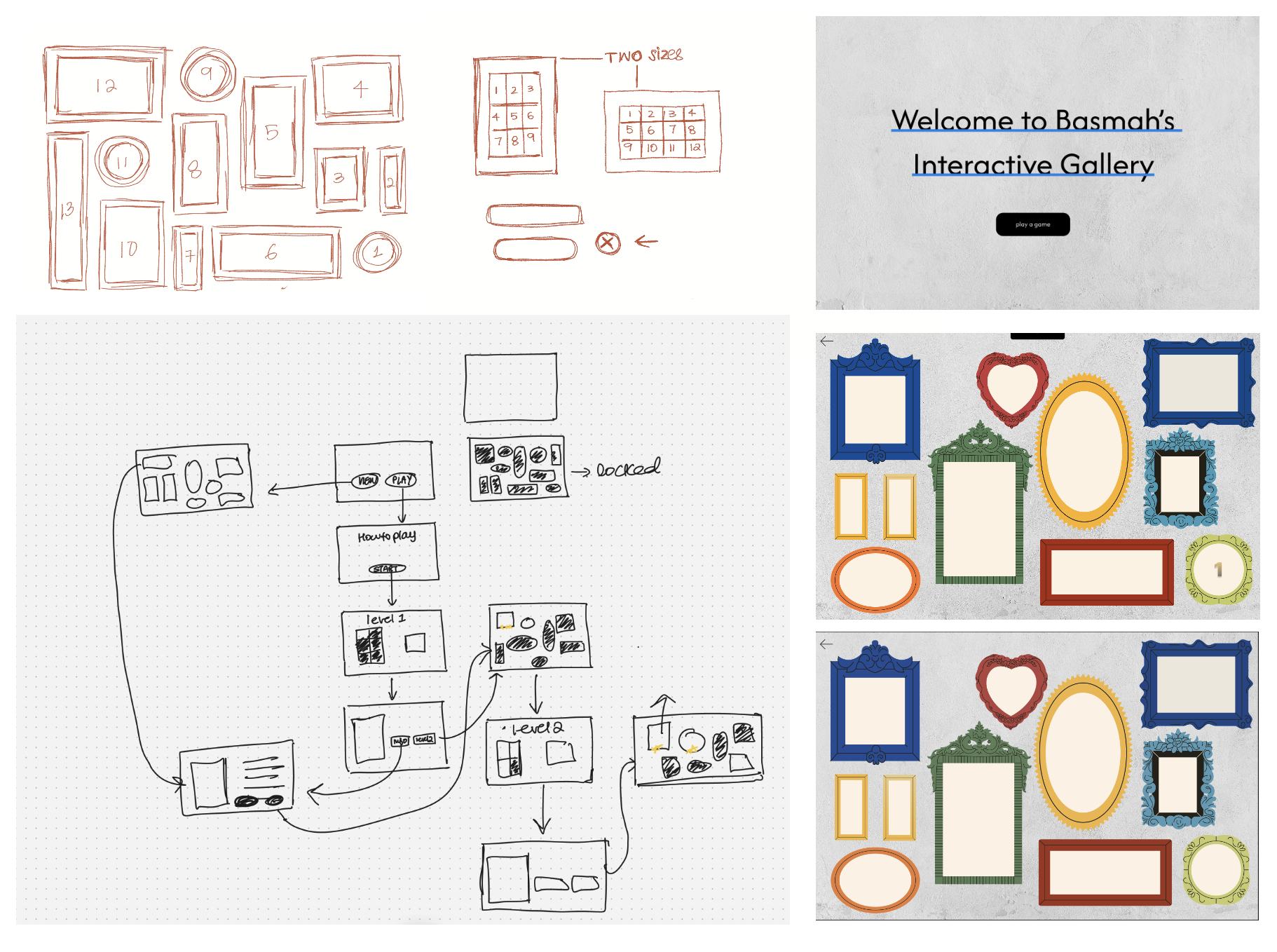
Problem #1: Users did not know where to begin
In the first version, the gallery interaction was not immediately clear. Users needed stronger visual guidance.
Iteration: I added numbered frames to guide users through the experience and make the order of interaction easier to understand.
Problem #2: Users wanted access to the gallery before playing
Some users wanted to explore the paintings first before engaging with the game. Locking the gallery behind gameplay made the experience feel restrictive.
Iteration: I made the gallery accessible upfront so users could browse, learn, and then choose whether to play.
Problem #3: Users wanted exhibition photos before completing the game
Users were curious about the physical exhibition and wanted to see the event documentation without waiting until the end.
Iteration: I added a “View Exhibition Pictures” pathway so users could access the photo album at their own pace.
Problem #4: The experience needed to balance play and accessibility
The puzzle interaction made the experience more engaging, but it could not become a barrier.
Iteration: I separated the experience into multiple pathways: play, view gallery, and view exhibition photos.
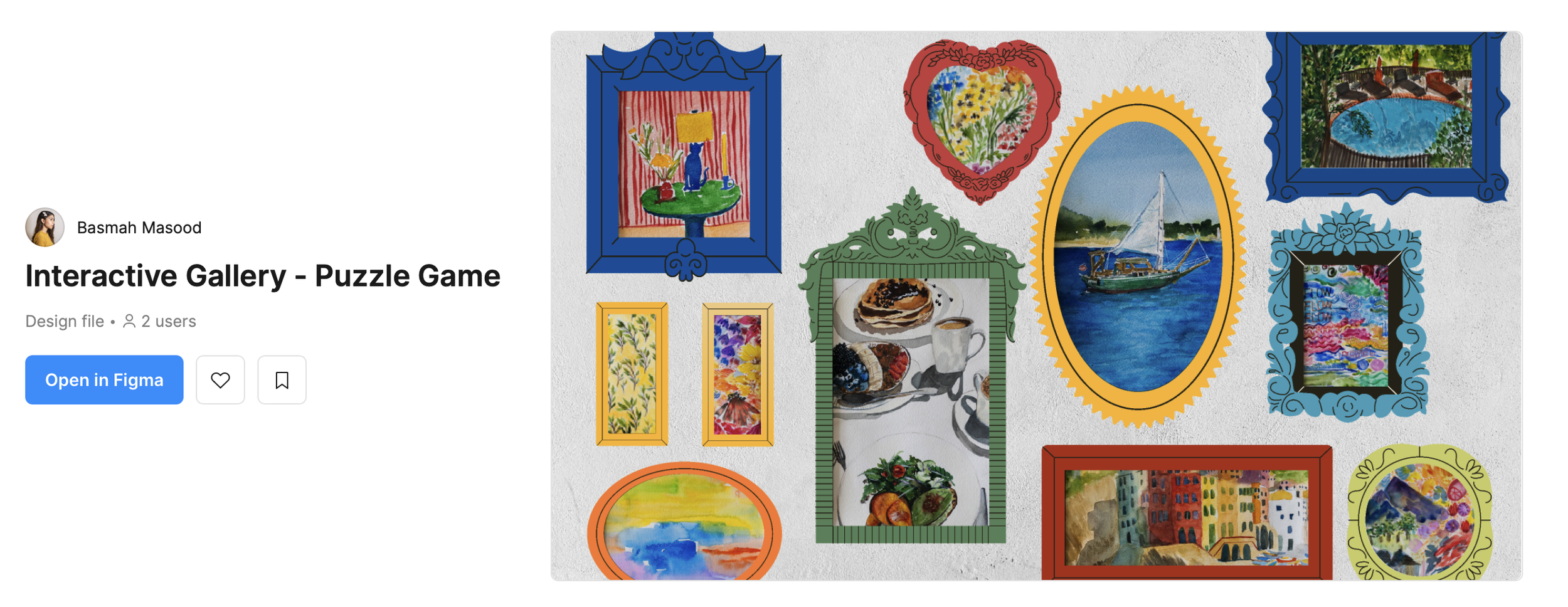
Explore the user journey in action! View the Figma file and see how the gallery interacts.
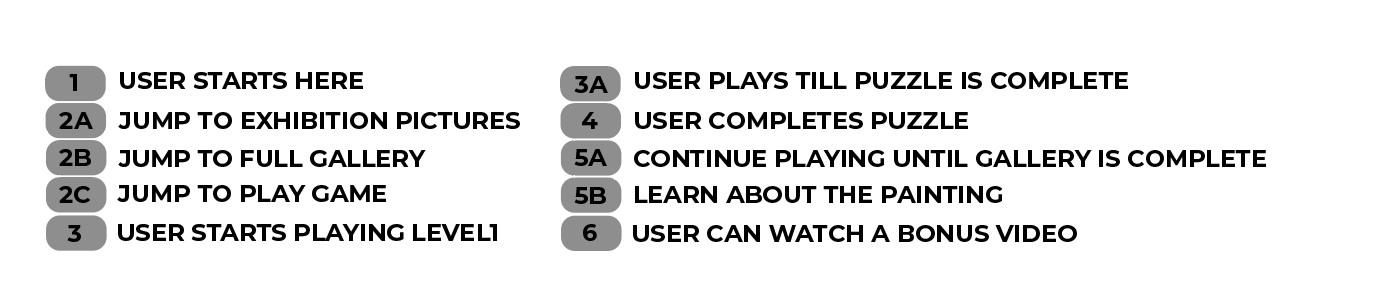
USER JOURNEY
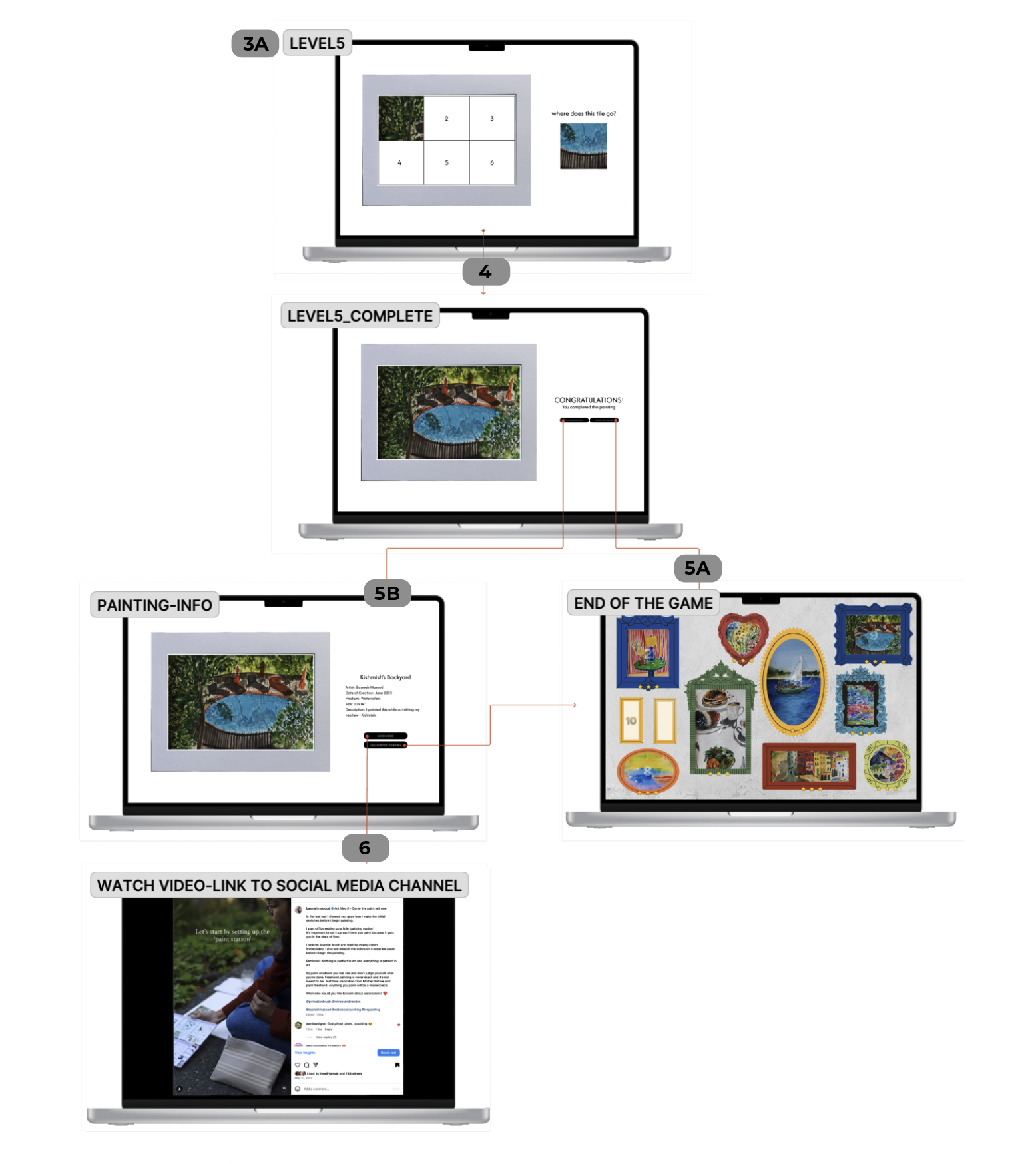
The user journey begins with curiosity. A visitor enters the experience and is invited to choose how they want to explore. They can start the game, browse the gallery, or view exhibition pictures.
If they choose to play, they move through puzzle interactions that gradually reveal paintings. If they choose to browse, they can view the artwork and read about each piece directly. If they choose the exhibition album, they can understand the context of the physical show.
This journey was designed to support different levels of engagement. A user can spend a few minutes browsing or take more time moving through the interactive puzzle experience.
USER MAP
CHALLENGES
One of the main challenges was designing an experience for users who may not be familiar with interactive digital galleries. I had to make the flow playful without making it confusing.
Another challenge was balancing gamification with accessibility. The game could not feel like an obstacle. It needed to support engagement while still allowing users to access the artwork directly.
I also had to consider how to translate the emotional quality of a physical exhibition into a digital format. Since users could not walk through the space in person, the interaction needed to create a sense of discovery and personal connection.
OUTCOMES
The final prototype created a more engaging way for remote viewers to experience the painting exhibition.
The project successfully:
Transformed a static online gallery into an interactive experience.
Helped remote users feel included in the exhibition.
Encouraged users to spend more time with the paintings through puzzle-based discovery.
Provided flexible pathways for different types of users.
Improved clarity through feedback-driven iterations such as numbered frames, upfront gallery access, and exhibition photo access.
Through this project, I learned that interaction should not only create delight — it should also respect user choice. A playful experience becomes stronger when users can decide how deeply they want to engage.
FUTURE IMPROVEMENTS
If I continue developing this project, I would like to add features that make the experience more immersive and easier to return to.
Potential improvements include:
Save progress
Allow users to return to the gallery without starting over.Hint system
Add optional hints so users can stay engaged without feeling stuck.Music and sound
Use audio to create atmosphere and make the gallery feel more immersive.Countdown timer for advanced levels
Add urgency to later levels for users who want more challenge.3D or VR gallery version
Expand the experience into a spatial digital gallery where users can move through the exhibition more like a physical space.
PLAY GAME

Click on the image and expand to full-screen to start playing the game.